
![Local Service Ads for Law Firms: The Complete Guide [2026]](https://pareto.legal/wp-content/uploads/2026/05/local-service-ads-for-law-firms-the-complete-guide-2026-local-service-ads-for-law-firms-the-complete-guide-2026.jpg)
A potential client searches for a lawyer, sees your face and reviews at the top of Google, and calls you directly. You only pay when that call happens.
That’s at the crux of how local service ads (LSAs) work.
No bidding on keywords or building landing pages.
LSAs are the closest thing your law firm can do to buy cases.
Here’s what you need to remember, though: The firms winning with LSAs driving millions in case revenue with it are winning because they treat LSAs as an operations channel. You can’t treat them like the marketing team’s responsibility.
I’ve managed over 500 ad accounts for plaintiff-side law firms. In this guide, you’ll learn everything from setup to ongoing LSA management. Let’s begin.
What Are Local Service Ads?
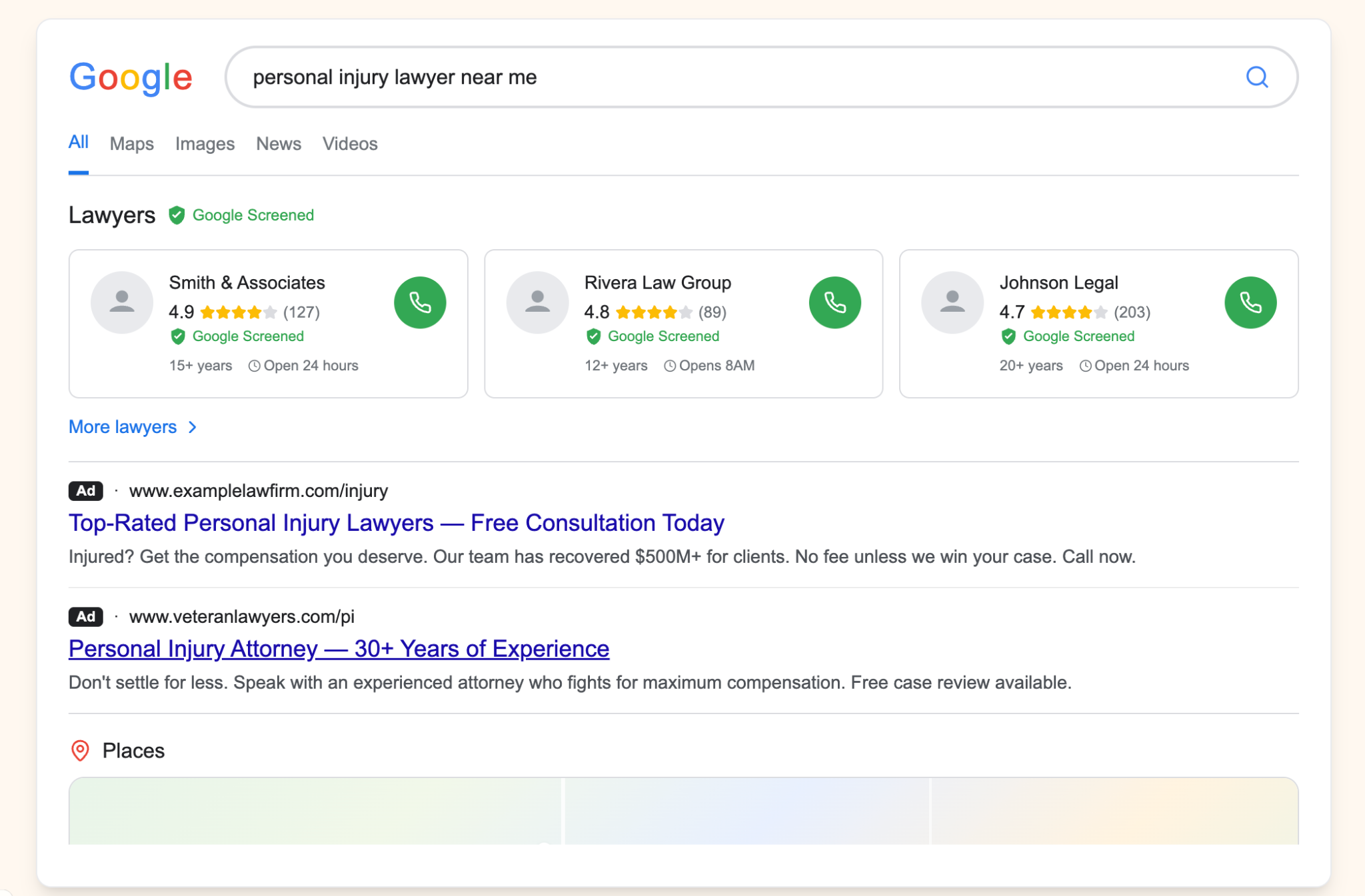
Local Service Ads for lawyers are Google’s pay-per-lead ads that help attorneys appear at the very top of Google search results. You pay only when a prospect calls or sends you a message, thereby helping you generate qualified leads. They help attorneys improve visibility in their geographical market and build trust with a Google Verified badge (earlier called Google Screened).
With these ads, your law firm can appear above Google Ads, the map pack, and organic results for high-intent keywords like “personal injury lawyer [your city]” or “criminal defense attorney near me.”
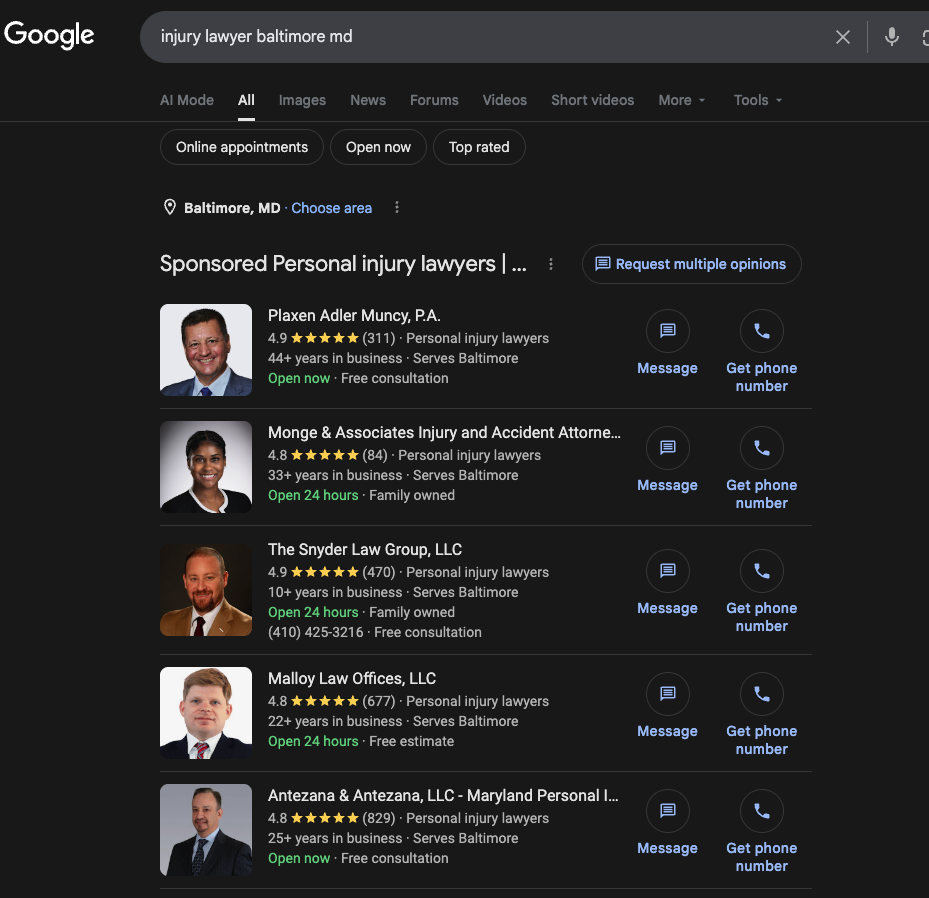
An LSA listing shows your headshot, firm name, Google review count and rating, the Google Verified badge, hours of operation, and a click-to-call button. There’s no ad copy to write, no creative to test. It’s a headshot, your reviews, and a phone number.
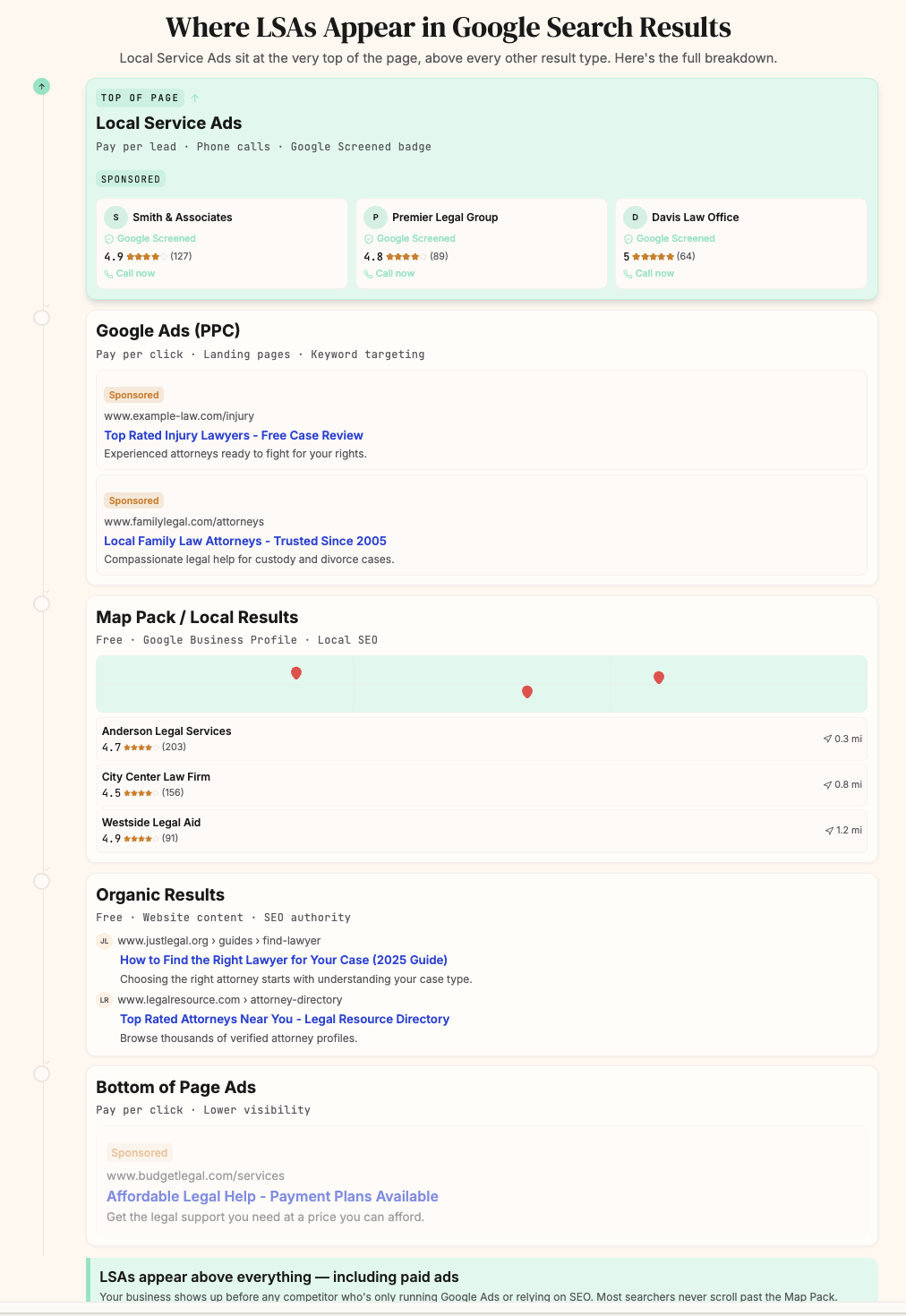
The key differences between LSA and Google Ads for lawyers are as follows:
-
Pay per lead, not per click. You’re only charged when someone actually contacts your firm. That’s primarily through phone calls, with some message leads mixed in.
-
No keyword targeting. Google determines when to show your ad based on your selected practice areas and geography. You can’t bid on specific keywords.
-
Phone-call dominant. The majority of LSA leads are phone calls, which consistently convert at higher rates than form submissions or live chat leads.
-
Google Verified badge. After passing background and license verification checks, your firm earns a Google Verified badge that signals trust to potential clients.
Can Your Law Firm Run LSAs?
Before diving into setup, see how Thomas Glasgow breaks down what it takes to run LSA campaigns that produce signed cases.
If your law firm has a verified Google Business Profile and a commercial address, and your practice area appears on Google’s list of predefined list of “job types” you can run LSAs. Typically it includes practice areas searched locally, such as personal injury, family law, or estate planning.
Focus on Local Searches: These ads are ideal for law firms aiming to connect with potential clients within a specific, localized geographic area.
Non-consumer Legal Verticals are ineligible: Practice areas such as mass torts, tax law, corporate law, intellectual property and patent law, and other specialized legal services that do not involve direct, local consumer representation are not eligible for LSAs.
If your firm handles one of the eligible practice areas, you should be running LSAs.
LSAs vs. Google Ads (Why You Need Both…)
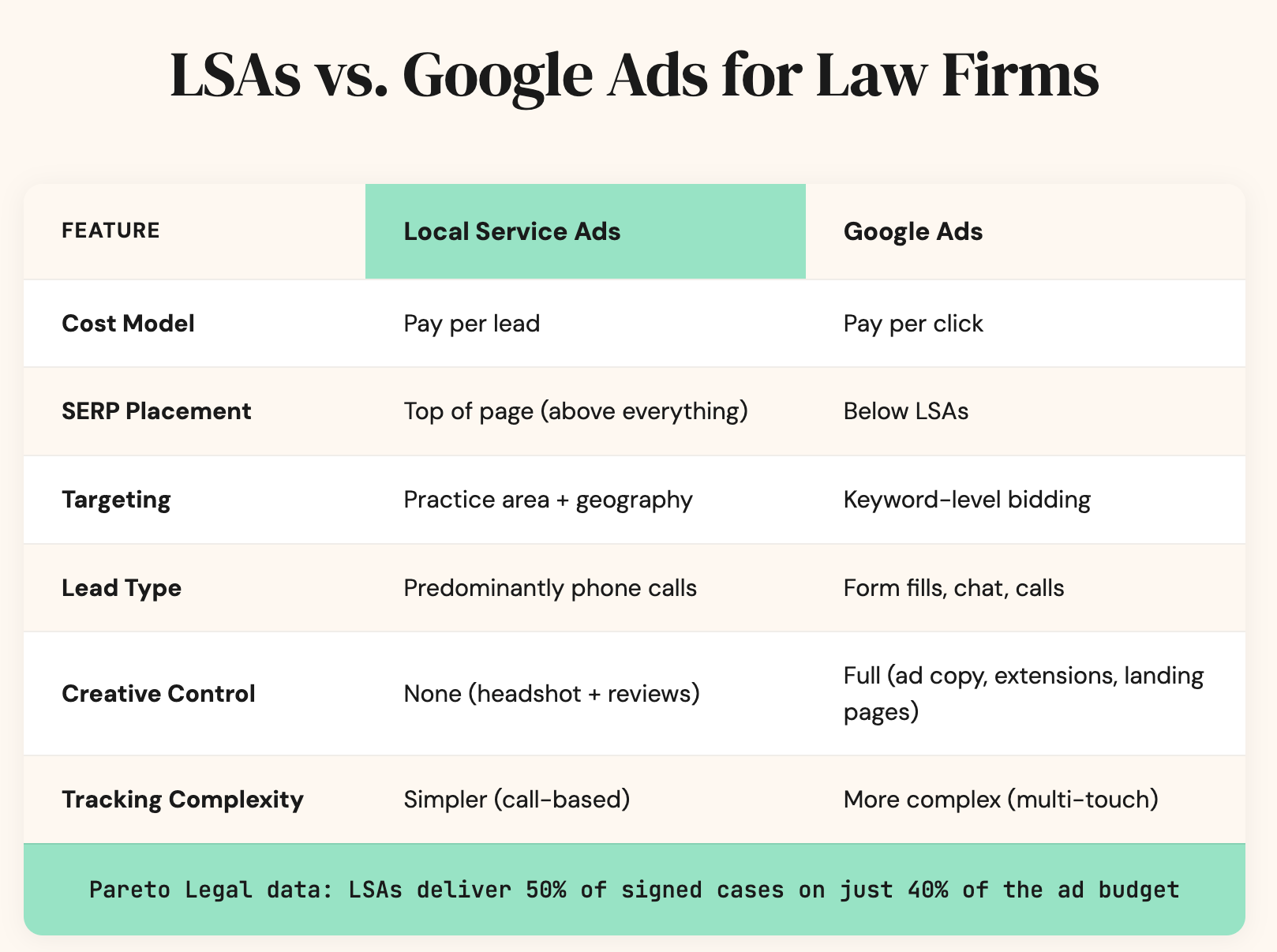
LSAs and Google Ads serve different functions and should ideally run simultaneously, which is how we structure law firm PPC for plaintiff-side firms.
Here’s a side-by-side of how the two channels compare:
| LSAs | Google Ads | |
|---|---|---|
| Cost model | Pay per lead | Pay per click |
| Placement | Top of SERP (above everything) | Below LSAs |
| Targeting | Practice area + geography | Keyword-level |
| Lead type | Predominantly phone calls | Clicks to landing pages, forms, chat |
| Creative control | Headshot + reviews only | Full (ad copy, extensions, landing pages) |
I recommend that you not compare cost per lead across these channels. Compare the cost per signed case.
For our clients, LSAs deliver 50% of signed cases with only 40% of their ad budget. The cost per lead is often higher than Google Ads. But the cost per signed case is lower because phone call leads from high-intent searches convert at significantly higher rates than form fills and chat leads.
How to Set Up LSAs for Your Law Firm
Step 1: Check Eligibility and Select Practice Areas
Go through Google’s eligibility tool and select only the practice areas your firm actually handles. Be precise.
Warning: Do NOT select “General Law Firm Leads.” This is the single most common mistake we see in ad accounts we inherit. I’ll cover a case study later that shows why. General Law Firm Leads drives a flood of people searching for “a lawyer” without specifying what kind. It tanks your lead quality and wastes budget.
Also Read:Criminal Defense PPC →The Google Ads side of the stack, for defense firms running LSAs
Step 2: Create Your Business Profile
Set up your firm’s profile with your name, address, headshot, and a description of your services. Connect your Google Business Profile. This is critical because your GBP reviews directly impact LSA rankings.
Step 3: Set Your Geography
Do not set your targeting to the entire United States. Most firms are barred in one to three states. So target areas where your firm is barred and can actually take clients.
If you’re barred in multiple states, set up separate Google Business Profiles per state and connect each to its own LSA campaign. You don’t want your New York profile showing to someone searching in Connecticut.
Step 4: Set Your Budget and Bid Settings
Start somewhere in the $1,500 to $3,000 per month range, depending on your market. Google prioritizes advertisers that give it more budget flexibility. The closer you get to a “blank check” approach, where you let Google optimize, the more volume you’ll get.
Also please don’t change your bid settings too often. Every time you adjust, you throw the account back into a learning phase, and Google will re-figure out where you fit in the auction.
Step 5: Get Google Verified
Complete background checks and license verification for each attorney at your law firm. Do this promptly, as delays can cause your account to be paused.
Step 6: Configure Hours and Availability
If your firm can handle calls around the clock, set your ads to run 24/7. If you can only answer during business hours, match your ad schedule to your actual availability. Running ads when nobody is answering the phone is worse than not running them at all (I explain why in the next section).
LSAs Are an Operations Channel, Not Just a Marketing Channel
This is where many advertising agencies fall short. They treat LSAs as a pure advertising tactic. They set up your law firm’s account, pick your practice areas, set a budget, and wait for leads.
That’s the easy half. The hard half, and the half that actually determines whether LSAs work, is operations.
LSAs blur the line between marketing and operations.
-
The marketing side is the front-end setup: settings, targeting, bids, geography. We can fix that in a few clicks.
-
The operations side is answer rate and intake quality. That takes long-term consistency. And I would reckon it’s exponentially more important.
Answer Rate: The Number-One Factor Most Firms Ignore
Ideally, every single LSA call you get is answered. Every missed call is a lost potential case AND a negative signal to Google that deprioritizes your firm in the auction. Your target answer rate should be 90% or higher.
If your full-time intake team can’t guarantee 90%+, set up an answering service as a backup. Configure your call routing so that if internal staff doesn’t pick up within two to three rings, the call automatically rolls to the answering service.
This is not optional if you’re running LSAs.
Intake Quality: Google is Listening to Every Call
This is the part that surprises some law firms: Google is actively listening. On every LSA call, they evaluate:
-
whether your intake team establishes rapport,
-
qualifies the lead properly,
-
explains your services clearly,
-
and handles objections.
If your intake team underperforms, Google penalizes your firm. You get deprioritized in the search results. Lead volume drops.
Here’s the double-whammy: poor intake means you convert fewer of the leads you do get. AND Google gives you fewer leads to begin with.
At Pareto, we use AI-powered call analysis through our partnership with Speed AI to score intake performance on every LSA call. We’re not just telling clients “you got 47 leads at $X cost per lead.” We’re sharing qualitative insights: which leads were handled well, which weren’t, and what needs to change.
Monitoring call quality benefits both efficiency and volume. You convert more leads into cases, and Google rewards you with more leads. It’s a compounding effect.
Pro tip: Add a whisper message to your LSA calls. This is an automated message that plays for the intake team before the caller is connected: “This call came from Google Local Service Ads.” It serves two purposes: intake knows to tag the lead source for attribution, and they know Google is evaluating the call quality, so they bring their best.
Message Leads: A Growing Channel For Lawyers
While phone calls make up the majority of LSA leads, message leads are a growing share. When a prospect sends a message through your LSA listing, they fill out a form with their name, contact info, and a brief description of their legal issue. You receive this as an email notification, a text, or both, depending on your settings.
Here’s the problem: Google tracks your message response time the same way it tracks your call answer rate. If you take hours to respond to messages, the algorithm deprioritizes your firm. The benchmark is responding within 15 minutes during business hours.
How to handle message leads operationally:
-
Configure notifications correctly. Set up both email and SMS notifications for message leads so they don’t get buried in an inbox. Assign a specific person or team to own the message lead response.
-
Respond within 15 minutes. This is the threshold that signals to Google that your firm is responsive. Even if your response is “Thank you, we received your message. One of our attorneys will call you within the hour,” it counts.
-
Move to the phone immediately. Message leads convert at lower rates than phone calls. Your goal is to get the prospect on the phone as fast as possible. Your first response should include a direct line to call or an offer to call them.
-
Set up auto-replies as a safety net. If your team can’t guarantee a 15-minute response window, configure an auto-reply that acknowledges the message and sets expectations. This buys you time without signaling to Google that you’re unresponsive.
-
Track message leads separately in your CRM. Tag them differently from phone leads. Message leads are typically earlier in the decision process and may need a different intake approach. They are less “Are you ready to come in for a consultation?” and more “Let me understand your situation and see if we can help.”
Reviews: The Ranking Fuel for LSAs
LSA rankings are heavily tied to your Google Business Profile reviews. Google looks at total review count, average star rating, review velocity (how often new reviews come in), and recency.
Build a Review Strategy In-House
In 2026, you can’t outsource review acquisition. Google has cracked down on firms cutting corners with reviews. If you’re serious about growing your firm, reviews need to be an internal operational priority.
Here are some tips to make them work for you:
-
Assign ownership. One person at the firm owns the review initiative. They don’t do it alone, but they oversee it. It includes following up with attorneys, paralegals, and secretaries to make sure review requests are going out consistently.
-
Track weekly, not monthly. You want to track them on a weekly cadence with a target of one to five new reviews. Google rewards consistency over spikes.
-
Embed it in your CRM. Set up automated review request triggers in your case management system. When a case hits a certain status or milestone, it fires off a review request.
-
Gamify it. Bonuses, days off, gift cards, and internal competition among staff can work. Make it something your team members actually want to participate in.
Remember that review velocity benefits your organic SEO rankings beyond LSAs too.
Profile Photos: The Overlooked Ranking Signal
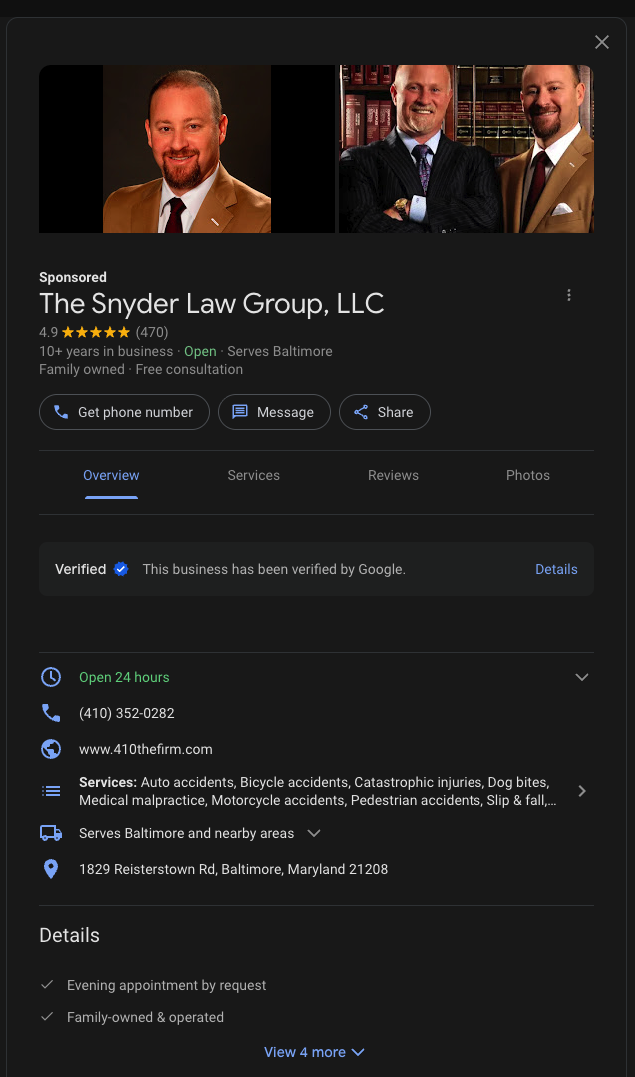
Since August 2024, Google automatically selects and displays photos from your LSA profile within your ad listing. Google has confirmed that high-quality images can improve your ad ranking. Its algorithm selects which photos to show based on their likelihood to boost engagement for a given search query.
Photos won’t appear in every ad impression, but when they do, they increase click-through and call rates for your law firm.
What to upload:
-
Upload 3 to 5 high-quality, original images to your LSA profile
-
Use a professional headshot as your primary image (this is the one that always shows)
-
Add photos of your team, your office, and your attorneys in professional settings
-
Avoid stock photos, copied images, or anything that doesn’t represent your actual firm
What NOT to do:
-
Don’t upload irrelevant images (courtroom stock photos, generic legal graphics)
-
Don’t use low-resolution or poorly lit images
-
Don’t skip photos entirely
This is low-effort, high-upside. If you have a professional headshot and a few office photos, upload them today.
Tracking LSA Leads to Signed Cases
Most firms can tell you how many LSA leads they got and what they cost. Very few can tell you how many of those leads became signed cases.
The Attribution Flow
-
Install unique call tracking numbers on your LSA profile. We use CallRail. This ensures every LSA call carries source attribution.
-
Push attribution into your CRM. When a lead comes in with LSA tagging, it flows into your case management system, and you can follow its lifecycle:
LSA call → intake → consultation → signed case.
-
Use whisper messages so your intake team knows the source in real time and marks it accordingly.
Report on Cost Per Signed Case, Not Cost Per Lead
This is the metric that matters. LSAs often have a higher cost per lead than Google Ads. But the cost per signed case is lower because call-based leads convert at higher rates. If you’re only comparing CPL across channels, you’re making decisions on incomplete data.
When LSAs Stop Working: The Diagnostic Playbook
When a firm tells us their LSAs stopped working, we run through these checks in order: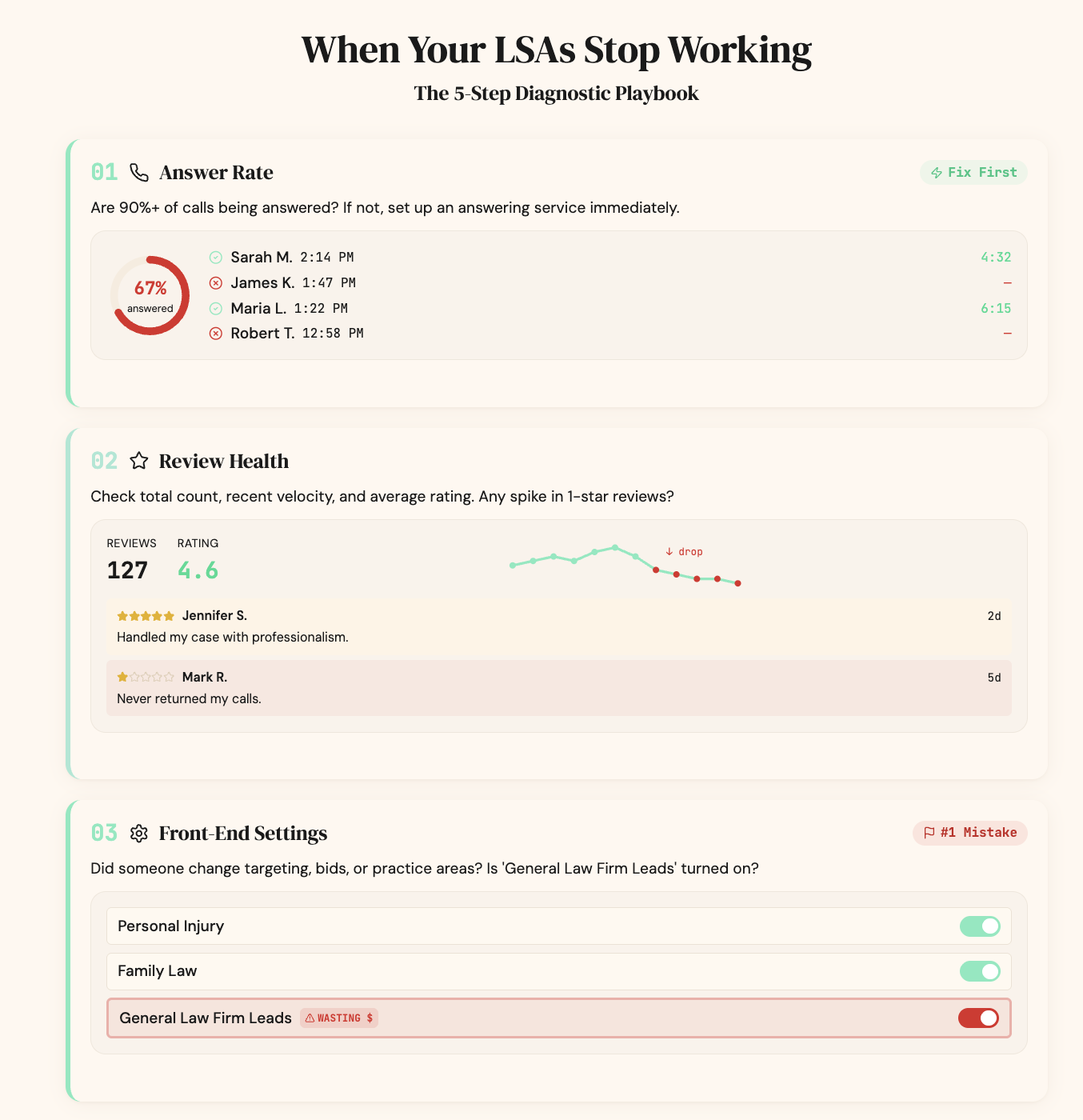
Check 1: Answer Rate
Are calls being answered at 90% or higher? If not, that’s the first fix. Implement an answering service backup immediately.
Check 2: Review Health
Check total count, recent velocity, and average rating. A spike in one-star reviews can tank performance fast.
Check 3: Front-End Settings
Did someone change targeting, bids, or practice areas recently? Is “General Law Firm Leads” accidentally turned on? The more you meddle with the account, the more Google pushes it back into a learning phase.
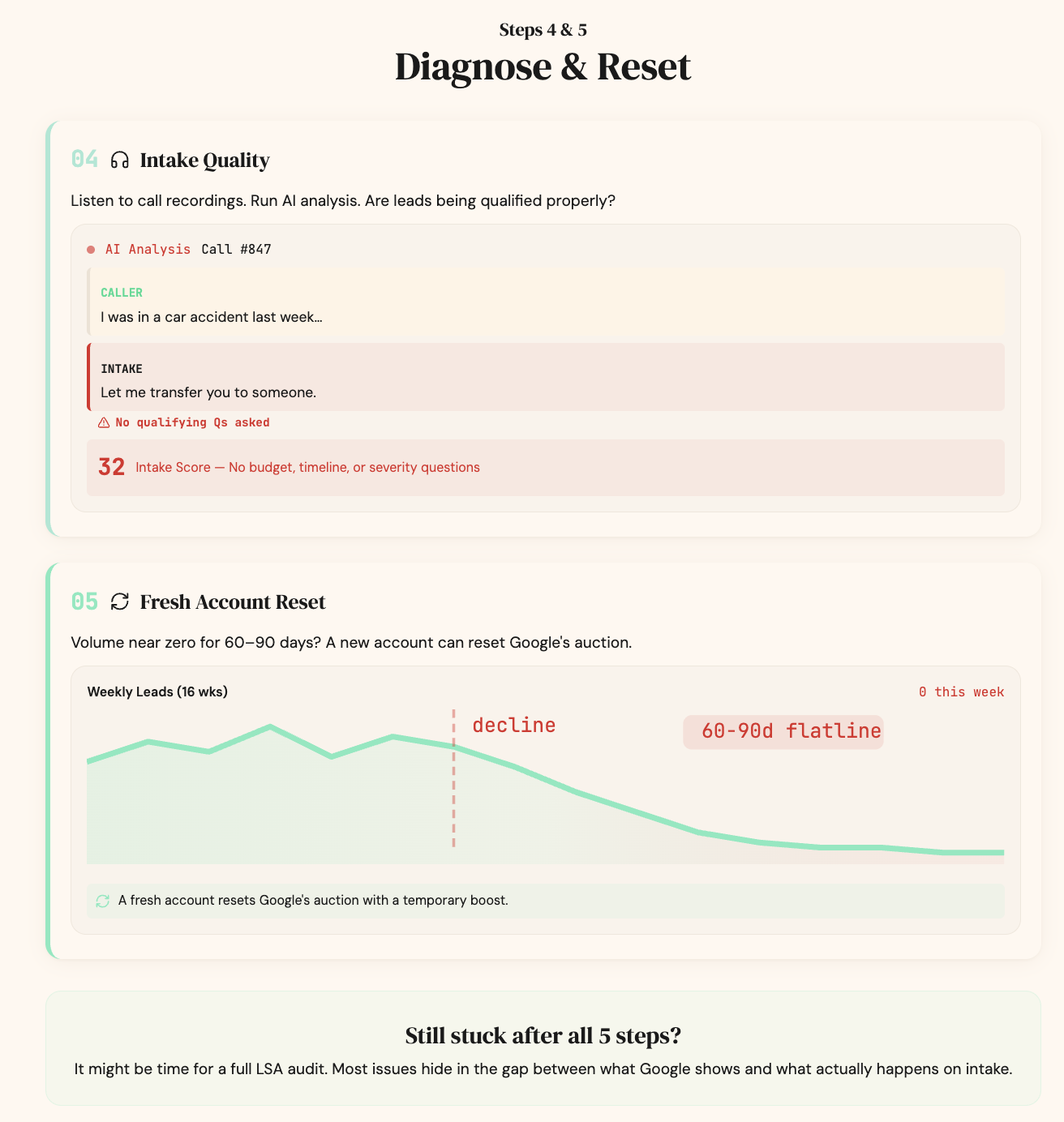
Check 4: Intake Quality
Listen to recent call recordings. Run AI analysis on the call transcripts with tools like Claude, trying to identify patterns. Are leads being handled well? Is the intake team qualifying properly?
Pro Tip: If your lead volume has been near zero for 60 to 90 days with no recovery, setting up a brand-new LSA account can work. It signals to Google that you’re a fresh advertiser and forces the algorithm to re-evaluate where you fit in the auction. We’ve seen this work multiple times.
Case Study: The “General Law Firm” Leads Trap
A firm came to us, spending $15,000 per month on LSAs for over a year. They were unhappy with the lead quality. They had lots of junk leads and a low conversion rate.
Within 30 seconds of logging into the account, we found the problem. They had chosen “General Law Firm Leads” as a targeting option. It was driving a flood of irrelevant inquiries from people just searching for “a lawyer” without specifying a practice area.
We turned it off.
Over time, their spending dropped by 70%. But their signed case volume stayed the same, which was about three cases per month. The efficiency gain was instant.
Over the next 12 months, something even better happened. Google got reinforced signals about the types of calls the firm actually wanted. Their case volume steadily increased. That firm is now generating multi-million-dollar worth of cases from LSAs alone.
Remember to choose your setting carefully, as it can save you years of wasted spending.
2024–2026 LSA Policy Changes Your Law Firm Should Know
The June 2025 Policy Update
Google required all LSA advertisers to accept new terms that included expanded Google ownership of ad assets, mandatory call and message data utilization, and a transition from the Google Guaranteed screen to a unified Google Verified badge.
This caused concern in the legal industry because of the attorney-client privilege. Google has effectively inserted itself as a third party into attorney-client intake conversations. As a lawyer, you don’t have an opt-out. If you didn’t accept the new terms, your ads were paused.
Here are some tips:
Safeguards to Implement
-
Add a disclaimer to your LSA profile mentioning limited confidentiality during initial calls.
-
Set up an auto-message for new callers: “This call may be recorded for quality assurance purposes.”
-
Remember that the attorney-client privilege doesn’t exist until the client signs a retainer. Once retained, direct existing clients to call a direct firm line. Not the LSA number. This keeps Google out of privileged conversations.
Automated Lead Crediting
Google has replaced manual lead disputes with automated AI-powered lead crediting. You can no longer dispute individual leads for monetary credits. What you can do is mark lead quality and satisfaction ratings as signals to Google, and use the “Mark Booked” feature to confirm signed clients. The monetary recovery from disputes is nominal at this point. It’s not a meaningful budget lever, but it’s something you should know about.
Ongoing LSA Management
Once your LSAs are working, the best thing you can do is leave them alone.
There is no such thing as “ad decay” with LSAs. The ad format is a headshot, your name, a phone number, and your review count. It’s not a creative ad. There’s nothing to decay or go stale. Unlike display or social ads, you’re not fighting creative fatigue.
Here’s your ongoing LSA maintenance checklist:
-
Mark and bookmark leads regularly inside the LSA platform
-
Provide quality feedback on leads (this signals to Google what types of leads you want more of)
-
Maintain a weekly review velocity
-
Monitor your answer rate weekly
-
Listen to call recordings (at least monthly)
-
Only adjust settings if there’s a specific, measurable performance concern
If something is working, don’t try to fix it. Changes reset the learning phase. Google rewards consistency.
Frequently Asked Questions
How much do LSAs cost for law firms?
LSAs charge per lead, and costs vary by practice area and market. Budget $1,500 to $3,000 per month as a starting point. Based on our experience managing LSA campaigns for plaintiff-side law firms:
| Practice Area | Typical CPL Range |
|---|---|
| Personal Injury | $150–$300+ |
| Family Law | $75–$200 |
| Criminal Defense | $50–$150 |
| Estate Planning | $40–$100 |
| Immigration | $50–$125 |
| DUI | $75–$175 |
What practice areas are eligible for Local Service Ads?
As of 2026, Google supports LSAs for law firms in the following practice area categories:
-
Personal Injury Lawyer
-
Criminal Lawyer
-
DUI Lawyer
-
Family Lawyer
-
Estate Lawyer
-
Immigration Lawyer
-
Bankruptcy Lawyer
-
Business Lawyer
-
Contract Lawyer
-
Real Estate Lawyer
-
Traffic Lawyer
-
Labor/Employment Lawyer
-
Litigation Lawyer
-
Malpractice Lawyer
-
Disability Lawyer
-
Intellectual Property Lawyer
Each category contains specific “job types” underneath it. For example, personal Injury includes auto accidents, slip and falls, wrongful death, and more.
Practice areas that involve non-local or non-consumer legal work, such as mass torts, corporate transactional law, tax law, and patent prosecution, are not eligible. Google periodically expands this list, so check their eligibility tool for the most current categories.
Can small law firms compete with large firms on LSAs?
Yes. Google rewards call quality and intake performance, not just budget. A small firm with excellent intake can take market share from a large firm that drops calls.
How does Google rank LSA listings?
A combination of factors: review count and quality, proximity to the searcher, responsiveness (answer rate), business hours, and the quality of interactions on calls.
Should I run LSAs AND Google Ads for my law firm?
Absolutely. They’re complementary. LSAs capture high-intent phone calls at the top of the SERPs. Google Ads let you target specific keywords and drive traffic to landing pages. Together, they maximize your visibility.
How long does it take for your law firm to start seeing results from LSAs?
Most firms start receiving leads within the first few weeks of going live, assuming the account is set up correctly and the firm is answering calls.
Stop Leaving Cases on the Table
LSAs work when your marketing setup and operations are aligned. Most firms get the setup right and ignore the operations side, and then wonder why the leads dried up.
At Pareto Legal, we don’t just manage your LSA settings. We analyze call quality, build attribution from ad click to signed case, and partner with firms to fix the intake problems that Google penalizes. That’s what makes the difference between LSAs that generate junk leads and LSAs that generate millions in case revenue.
Contact us to get an LSA audit.